AppAssure Data Backup Software Video Series: Attachability Check for SQL
AppAssure Product Demo
[Read more…] about AppAssure Data Backup Video: Attachability Check for SQL
Great Lakes Computer Corporation
Managed Service Provider
[Read more…] about AppAssure Data Backup Video: Attachability Check for SQL
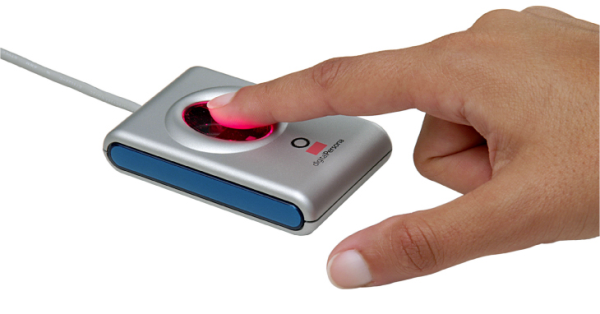 Once a business decides to take the leap into the efficiencies offered by a point of sale system, the issue of POS peripherals is likely to arise. Many different devices can function as POS peripherals; the category is so broad that it encompasses items such as cash drawers, receipt printers, coin changers, magnetic stripe readers and even fingerprint readers. The fingerprint reader is one of the most advanced POS peripherals available for SMBs at the current time.
How fingerprint readers work
Contrary to common belief, a POS fingerprint reader does not actually store an image of authorized employees’ fingerprints. Instead, it saves certain data points about a fingerprint and merges them into a template file that will be used for authentication purposes. For those concerned about POS security, it is not possible to reconstruct an authorized fingerprint from these template files.
When users attempt to log on to the POS systems that incorporate fingerprint readers, the fingerprint they supply at that time will be compared to the template file for the user. Only if there is an excellent match will the employee be authorized to commence using the system.
Care and maintenance of a POS fingerprint reader
It is in the best interest of every SMB to call for point of sale repair services only when necessary. Proper care of a fingerprint reader will minimize the need for repair calls.
All fingerprint readers perform best and last longer when kept clean. There are two recommended ways to clean most readers. The simplest is to use a piece of adhesive tape, applying it sticky side down directly onto the reading surface. Gently peeling it back will remove accumulated dust and lint. Alternatively, a mild glass cleaner can be applied to the reader window with a soft, lint-free cloth. Avoid cleaners based on alcohol; ammonia is a better choice.
Users should also avoid introducing liquids into the interior of the reader. This means never pouring anything onto the glass window containing the reading element since some of the liquid could potentially seep inside and cause a problem. As is true of most electronics, the reader should never be immersed, not even for cleaning purposes. It is also important to avoid scratches on the reader window. Never clean it with an abrasive element – even plain paper can be too harsh.
When POS equipment repair is needed, be sure to contract only with a company with demonstrated experience dealing with point of sale system repair.
For more information regarding proper POS equipment care please review the blog article, “Proper Care of POS Equipment,” by clicking below.

As IT environments become more complex, and the role of the enterprise network grows, smart organizations recognize the need to monitor their network to ensure their ROI. Implementing an application-aware network performance management solution helps provide seamless communication, identifying challenges before they become problematic and maintaining end-user productivity.
So how can you actively manage your network? Join Liz Padula, Marketing Manager at Riverbed Technology, and Cindy Borovick, Program Vice President for IDC’s Enterprise Communications and Datacenter Networks services, as they discuss how to:
August 8, 2012
2:00 pm ET / 11:00 am PT
Duration: 60 minutes

We Manage, Protect, Secure and Maintain Your IT Assets So You Can Build Your Future

